Hello all,
I am a HPC administrator setting up Open OnDemand for my institution. Currently, we are in the process of setting up interactive desktops for our users. We are close to getting this feature online; however, we are running into some errors, and I was wondering if we could get some assistance.
At the moment, we have successfully been able to submit and launch an XFCE desktop session with Slurm. The OOD dashboard displays the desktop running on one of our cluster’s nodes:
- Job Queue:

- Dashboard View:
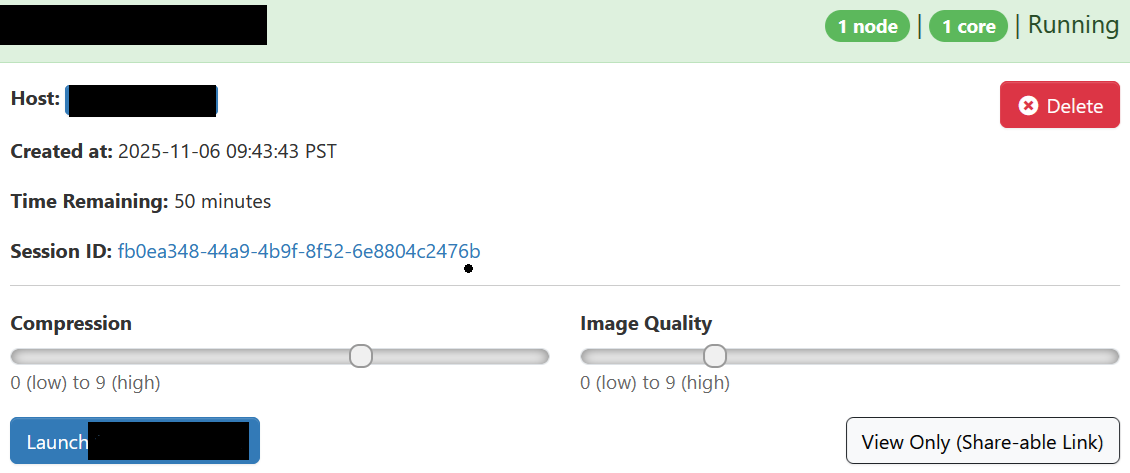
Unfortunately, when you click on the Launch button, the following error message appears:

I noticed there has been a few forum posts about this already, but none of the solutions worked for me.  I did some troubleshooting on my end, and I found my browser returned the following error message:

It seems we are not able to establish a websocket connection with the node we are launching the desktop on. When I click on the error, it seems I am getting a 404 error.

Interestingly enough, if I were to open a websocket on the node itself, I am able to connect manually to the desktop using that websocket. Additionally, I have setup the reverse proxy to work based on the guidelines here. Below is how our reverse proxy configuration looks.
- ood_portal.yml:
host_regex: '<server>' # <server> is the FQDN
node_uri: '/node'
rnode_uri: '/rnode'
My main question here is whether or not the issue we’re facing resides with OOD itself. In my opinion, it seems we are facing a network-related (perhaps a firewall?) issue. However, I wanted to rule out if OOD was the culprit since I’m still a beginner using the tool, so I’m unsure if I may have set something up incorrectly in the back end.
I have also attached the log files generated by OOD when the job is submitted. I don’t see an issue since the desktop can successfully run… but feel free to take a look and point out if any warnings should be addressed.
- output.log
Setting VNC password...
Starting VNC server...

Desktop 'TurboVNC: <server> (<user>)' started on display <server>:1

Log file is vnc.log
Successfully started VNC server on <server>:5901...
Script starting...
Starting websocket server...
Launching desktop 'xfce'...
[websockify]: pid: 335224 (proxying 25112 ==> localhost:5901)
[websockify]: log file: ./websockify.log
[websockify]: waiting ...

** (xiccd:335314): WARNING **: 09:43:47.374: EDID is empty
** (xiccd:335314): CRITICAL **: 09:43:47.438: failed to create colord device: failed to obtain org.freedesktop.color-manager.create-device auth
(polkit-gnome-authentication-agent-1:335390): polkit-gnome-1-WARNING **: 09:43:47.542: Unable to determine the session we are in: No session for pid 335390

[websockify]: started successfully (proxying 25112 ==> localhost:5901)
Scanning VNC log file for user authentications...
Generating connection YAML file...
Process already running (98:Address already in use). Exiting.

(nm-applet:335360): Gdk-CRITICAL **: 09:43:48.506: gdk_window_thaw_toplevel_updates: assertion 'window->update_and_descendants_freeze_count > 0' failed

** (update-notifier:335399): WARNING **: 09:43:49.086: Couldn't create directory monitor on /var/snap/canonical-livepatch/common. Error: Unable to find default local file monitor type
- vnc.log
06/11/2025 09:43:45 Using security configuration file /etc/turbovncserver-security.conf
06/11/2025 09:43:45 Enabled security type 'tlsvnc'
06/11/2025 09:43:45 Enabled security type 'tlsotp'
06/11/2025 09:43:45 Enabled security type 'tlsplain'
06/11/2025 09:43:45 Enabled security type 'x509vnc'
06/11/2025 09:43:45 Enabled security type 'x509otp'
06/11/2025 09:43:45 Enabled security type 'x509plain'
06/11/2025 09:43:45 Enabled security type 'vnc'
06/11/2025 09:43:45 Enabled security type 'otp'
06/11/2025 09:43:45 Enabled security type 'unixlogin'
06/11/2025 09:43:45 Enabled security type 'plain'
06/11/2025 09:43:45 Desktop name 'TurboVNC: <server> (<user>)' (<server>:1)
06/11/2025 09:43:45 Protocol versions supported: 3.3, 3.7, 3.8, 3.7t, 3.8t
06/11/2025 09:43:45 Listening for VNC connections on TCP port 5901
06/11/2025 09:43:45   Interface 0.0.0.0
06/11/2025 09:43:45 Framebuffer: BGRX 8/8/8/8
06/11/2025 09:43:45 New desktop size: 1240 x 900
06/11/2025 09:43:45 New screen layout:
06/11/2025 09:43:45   0x00000040 (output 0x00000040): 1240x900+0+0
06/11/2025 09:43:45 Maximum clipboard transfer size: 1048576 bytes
06/11/2025 09:43:45 VNC extension running!
The XKEYBOARD keymap compiler (xkbcomp) reports:
> Warning:          Could not resolve keysym XF86CameraAccessEnable
> Warning:          Could not resolve keysym XF86CameraAccessDisable
> Warning:          Could not resolve keysym XF86CameraAccessToggle
> Warning:          Could not resolve keysym XF86NextElement
> Warning:          Could not resolve keysym XF86PreviousElement
> Warning:          Could not resolve keysym XF86AutopilotEngageToggle
> Warning:          Could not resolve keysym XF86MarkWaypoint
> Warning:          Could not resolve keysym XF86Sos
> Warning:          Could not resolve keysym XF86NavChart
> Warning:          Could not resolve keysym XF86FishingChart
> Warning:          Could not resolve keysym XF86SingleRangeRadar
> Warning:          Could not resolve keysym XF86DualRangeRadar
> Warning:          Could not resolve keysym XF86RadarOverlay
> Warning:          Could not resolve keysym XF86TraditionalSonar
> Warning:          Could not resolve keysym XF86ClearvuSonar
> Warning:          Could not resolve keysym XF86SidevuSonar
> Warning:          Could not resolve keysym XF86NavInfo
Errors from xkbcomp are not fatal to the X server
- websockify.log
WebSocket server settings:
  - Listen on :25112
  - No SSL/TLS support (no cert file)
  - proxying from :25112 to localhost:5901
Sorry for the long post, but I figured the more information I provide, the easier it would be to troubleshoot the issue. I tried writing a post a few days ago, but I accidentally submitted it before I was finished… so apologies about that as well if I broke a forum rule. 
Thanks,
An HPC Administrator