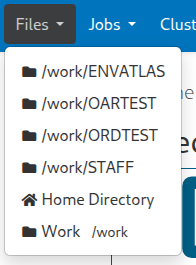
Sort order with files drop down

Were using the following code in /etc/ood/config/apps/dashboard/initializers/ood.rb with OnDemand 4.0.7

Rails.application.config.after_initialize do
  OodFilesApp.candidate_favorite_paths.tap do |paths|

    projects = User.new.groups.map(&:name)
    paths.concat projects.map { |p| FavoritePath.new("/work/#{p.upcase}")  }
    paths << FavoritePath.new("/work")
  end
end

Which produces

It appears Files renders the list in Alpha-Numeric order, regardless of the order they are inserted when calling FavoritePath.new. My question is, is there a way to force Home Directory back to the top of the list, but otherwise keep the list the same as shown. I’ve tried using a non-printable ASCII value for title: above 128

Rails.application.config.after_initialize do
  OodFilesApp.candidate_favorite_paths.tap do |paths|

    projects = User.new.groups.map(&:name)
    paths.concat projects.map { |p| FavoritePath.new("/work/#{p.upcase}", title: 173.chr)  }
    paths << FavoritePath.new("/work", title: 173.chr)
  end
end

Which correctly sorts, but produces a display artifact because 173.chr can’t be rendered.

I’ve tried other XXX.chr values as well as just title: “”, but without success. So, I thought I’d ask. Is there a Ruby trick (or just something I missed in the User Guide) I can use to force Home Directory back to the top of the Files list, regardless of what might be added with FavoriatePath.new.

Thanks!

Looking at the code for this, I don’t see any sorting even happening so I’m also confused why that is going on, in fact Home Directory is hard coded in the view so I’m surprised it’s doing this.

The only thing I can think of is can you see what projects returns before you concat it to paths? It may be the groups cause a sort of some kind and projects is being sorted there due to Linux/Unix reasons of the ouput.

Relevant code:

Wanted to jump in and point out that the navbar items are not generated by the same code as the favorites that show up inside the files app, so the code controlling this is

However this still has the home directory hard coded into the first position, so doesn’t explain the sorting. I also don’t notice this happen on OSC systems also running 4.0.7 and using the same strategies in the initializer.

and even the non-hardcoded favorite paths remain in the order defined in the initializer. Does this issue also affect the favorites displayed on the right side of the files app?

Thanks for all the feedback. I ended up going with the following in ood.rb

Rails.application.config.after_initialize do
  OodFilesApp.candidate_favorite_paths.tap do |paths|

    projects = User.new.groups.map(&:name).sort
    paths.concat projects.map { |p| FavoritePath.new("/work/#{p.upcase}", title: "Work")  }
    paths << FavoritePath.new("/work", title: "Work")
  end
end

Which produces

The key thing with the Home Directory location in the Files drop down being at the top vs somewhere father down the list seems to be, if I exclude the title property when calling FavoritePath.new. Anytime title isn’t defined for a new FavoritePath entry, Home Directory gets moved below that entry.

So using the following, and explicitly setting title: “Work” for all the entries added in the map

paths.concat projects.map { |p| FavoritePath.new("/work/#{p.upcase}", title: "Work") }

Home Directory is at the top, as shown above

but using just

paths.concat projects.map { |p| FavoritePath.new("/work/#{p.upcase}") }

Where title isn’t included when FavoritePath.new is called, then Home Directory ends up below any entries added without a title value set. For example, the following

Rails.application.config.after_initialize do
  OodFilesApp.candidate_favorite_paths.tap do |paths|

    projects = User.new.groups.map(&:name).sort
    paths.concat projects.map { |p| FavoritePath.new("/work/#{p.upcase}")  }
    paths << FavoritePath.new("/work", title: "Work")
  end
end

produces

Also, I tried using Pathname.new in place of FavoritePath.new, but that resulted in the same

Rails.application.config.after_initialize do
  OodFilesApp.candidate_favorite_paths.tap do |paths|

    projects = User.new.groups.map(&:name).sort
    paths.concat projects.map { |p| Pathname.new("/work/#{p.upcase}")  }
    paths << FavoritePath.new("/work", title: "Work")
  end
end

Produces

So, no idea why it works for you and not me.

Playing around with this some more, I noticed the following, this code

Rails.application.config.after_initialize do
  OodFilesApp.candidate_favorite_paths.tap do |paths|

    projects = User.new.groups.map(&:name).sort
    paths.concat projects.map { |p| FavoritePath.new("/work/#{p.upcase}")  }

    paths << FavoritePath.new("/work")
  end
end

Produces

So, things are rendering/ordered correctly (i.e. in the same way that my code does) in the left side list in the file browser, but the Files drop down isn’t ordering the same way.

I’ve traced the issue to

./ood/apps/sys/dashboard/app/views/layouts/nav/_group_items.html.erb

<% OodAppGroup.groups_for(apps: group.apps, group_by: :subcategory, sort: group.sort).each_with_index do |g, index| %>
  <%= content_tag(:li, nil, class: ["dropdown-divider"], role: "separator") if index > 0 %>
  <%= content_tag(:li, g.title, class: ["dropdown-header"]) unless g.title.empty? %>
  <% g.apps.each do |app| %>
    <% app.links.each do |link| %>
      <li role="none">
        <%=
          link_to(
            link.url.to_s,
            title: link.title,
            class: "dropdown-item",
            target: link.new_tab? ? "_blank" : nil,
            aria: ({ current: ('page' if (current_page?(link.url))) }),
            role: 'menuitem',
            data: link.data
          ) do
        %>
          <%= icon_tag(link.icon_uri) unless link.icon_uri.to_s.blank? %> <%= link.title %>
          <% if link.subtitle.present? %>
            <%= content_tag(:small, link.subtitle, class: 'visible-xs-block visible-sm-inline visible-md-inline visible-lg-inline ms-2') %>
          <% end %>
        <% end %>
      </li>
    <% end %>
  <% end %>
<% end %>

Specifically, the first line where its setting sort: group.sort

Looking at ./ood/apps/sys/dashboard/app/apps/ood_app_group.rb

  def self.groups_for(apps: [], group_by: :category, nav_limit: nil, sort: true)
    groups = apps.group_by { |app|
      app.respond_to?(group_by) ? app.send(group_by) : app.metadata[group_by]
    }.map { |k,v|
      OodAppGroup.new(title: k, apps: sort ? v.sort_by { |a| a.title } : v, nav_limit: nav_limit)
    }
    sort ? groups.sort_by { |g| [ g.title.to_s.empty? ? 1 : 0, g.title ] } : groups # make sure that the ungroupable app is always last
  end

If sort comes in not false, then its going to sort on title, which is against what was said above. However, if I change

<% OodAppGroup.groups_for(apps: group.apps, group_by: :subcategory, sort: group.sort).each_with_index do |g, index| %>

To

<% OodAppGroup.groups_for(apps: group.apps, group_by: :subcategory, sort: false).each_with_index do |g, index| %>

Then the Files list doesn’t sort and I get the expected results, same as I see in the File Browser left panel

Is there a better way to do this? Does changing to sort: false like this going cause any unexpected artifacts? I don’t see anything else different in the GUI, but maybe there is a better way to do this that doesn’t require a change to core ERB code file.

Thanks!

For anyone else’s benefit who might stumble across this post in the future.

Following standard OOD procedures for these kinds of changes, I copied /var/www/ood/apps/sys/dashboard/app/views/layouts/nav/_group_items.html.erb to /etc/ood/config/apps/dashboard/views/layouts/nav/_group_items.html.erb and modified the _group_items.html.erb file to

<% OodAppGroup.groups_for(apps: group.apps, group_by: :subcategory, sort: false).each_with_index do |g, index| %>
  <%= content_tag(:li, nil, class: ["dropdown-divider"], role: "separator") if index > 0 %>
  <%= content_tag(:li, g.title, class: ["dropdown-header"]) unless g.title.empty? %>
  <% g.apps.each do |app| %>
    <% app.links.each do |link| %>
      <li role="none">
        <%=
          link_to(
            link.url.to_s,
            title: link.title,
            class: "dropdown-item",
            target: link.new_tab? ? "_blank" : nil,
            aria: ({ current: ('page' if (current_page?(link.url))) }),
            role: 'menuitem',
            data: link.data
          ) do
        %>
          <%= icon_tag(link.icon_uri) unless link.icon_uri.to_s.blank? %> <%= link.title %>
          <% if link.subtitle.present? %>
            <%= content_tag(:small, link.subtitle, class: 'visible-xs-block visible-sm-inline visible-md-inline visible-lg-inline ms-2') %>
          <% end %>
        <% end %>
      </li>
    <% end %>
  <% end %>
<% end %>

OOD Developers / Support, if you get time to review this thread, please let me know if changing to sort: false for _group_items.html.erb is going to cause me any issues or if there is a better way to do this.

Thanks!

Thank you so much for digging into this so deeply and I am very glad you have found a possible solution. As far as side effects to this change, I think the reason sort is there in the first place is to organize the Interactive Apps dropdown, so modifying that could change the order on those. But if setting sort: false fixes the issue, then I think what must be happening is that the ood_app object for files is being set without role: 'files' which is why that call to app.links is not being overridden by the snippet I provided earlier. I try to dig into this more, and make sure that I am not missing something else that overrides that default sort behavior, but in the meantime could you confirm that your ./ood/apps/sys/files/manifest.yml looks like

In conclusion, I wouldn’t worry too much about your partial substitution as a quick fix, it could mess up order somewhere else but nothing critical. The time that such a fix could cause issues is when you update, as you would have to update your partial with any changes made for 4.1. It seems like a good stopgap though until we find the root cause.

Thanks again for your investigations!